hono-basics
Honoを基本から学ぶ
Guides / Testing
疑問がある。
https://github.com/kazurayam/hono-basics/blob/master/packages/testing/src/sample.test.ts にこういうtestを書いた。このtestは実行するとPASSする。
    test('POST /posts using Request class', async () => {
        const req = new Request('http://localhost/posts', {
            // It seems that the app (instance of Hono) will ignore the hostname 'localhost' and the port (80)
            // Am I right?
            method: 'POST'
        })
        const res = await app.request(req)
        expect(res.status).toBe(201)
        expect(res.headers.get('X-Custom-Header')).toBe('Thank you')
        const json = await res.json()
        expect(json).toEqual({ message: 'Post created' })
    })
ここで http://localhost/posts というURLを指定している。
http プロトコルじゃなくて https を指定し、別のhostnameや別のport番号を指定したらどうなるだろう。つまりURLの形式には適合的だが、対応するHTTPサーバの実物が存在しないURLを指定したらどうなるか。例えばこんなふうに:
    test('POST /posts using Request class with non-existent URL', async () => {
        const req = new Request('https://127.1.2.3:8080/posts', {
            // It seems that the app (instance of Hono) will ignore the protocol(https), hostname(127.1.2.3) and port(8080)
            // Am I right?
            method: 'POST'
        })
        const res = await app.request(req)
        expect(res.status).toBe(201)
        expect(res.headers.get('X-Custom-Header')).toBe('Thank you')
        const json = await res.json()
        expect(json).toEqual({ message: 'Post created' })
    })
なんと、これもPASSした!
$ bun run test:testinghono
$ bun test --cwd ./packages/testinghono
bun test v1.3.6 (d530ed99)

src/sample.test.ts:
✓ Example > GET /posts [0.46ms]
✓ Example > POST /posts [0.91ms]
✓ Example > POST /posts with JSON data [0.11ms]
✓ Example > POST /posts with multipart/form-data [0.34ms]
✓ Example > POST /posts using Request class [0.11ms]
✓ Example > POST /posts using Request class with curious hostname and port [0.06ms]

 6 pass
 0 fail
 17 expect() calls
Ran 6 tests across 1 file. [13.00ms]
後者のtestがPASSしたという事実から推測するに、Requestクラスのコンストラクタの第一引数として指定したURL文字列の hostname と port をapp.request()が無視している。
そうなのか?
...
        const req = new Request('https://127.1.2.3:8080/posts', { method: 'POST' })
        const res = await app.request(req)
...
このコードにおて appオブジェクトのrequestメソッドが https://127.1.2.3:8080 を無視して /post を抜き出して利用するならば、それは
...
        const res = await app.request('/posts', { method: 'POST' })
...
と同じだ。そう理解することもできる。
さらに考えを進めてみよう。sample.test.tsの69行目にこういうtestを書いた。
    test('POST /posts using Request class with syntactically valid but ridiculous URL', async () => {
        const req = new Request('protocol://hostname:9999/posts', {
            // It seems that the app (instance of Hono) will ignore the protocol(https), hostname(127.1.2.3) and port(8080)
            // Am I right?
            method: 'POST'
        })
        const res = await app.request(req)
        expect(res.status).toBe(201)
        expect(res.headers.get('X-Custom-Header')).toBe('Thank you')
        const json = await res.json()
        expect(json).toEqual({ message: 'Post created' })
    })
これもPASSした。new Hono()が代入されたappは protocol://hostname:9999/posts という出鱈目なURLを受けとっても平気だ。URLのpath部分つまり /posts という箇所だけを参照して HTTPステータス 201 を応答した。
続けて81行目にこういうテストを書いた。
    test('POST /posts using Request class with invalid path URL will return 404 Not Found', async () => {
        const req = new Request('protocol://hostname:9999/postzzz', {
            // The path '/postzzz' is invalid
            method: 'POST'
        })
        const res = await app.request(req)
        expect(res.status).toBe(404) // Not Found
    })
URLのpathを /postzzz にした。このpathは実在しない。appは /postzzz を受け付けるように作られていない。だから404 Not Found を応答した。
なるほど。腑に落ちた感じがする。
Helpers / Testing
元ネタの冒頭にこう書いてある。
The testClient() function takes an instance of Hono as its first argument and returns an object typed according to your Hono application’s routes, similar to the Hono Client.
この文が何を意味しているか、よくわからない。研究してみよう。
    const client = testClient(app)

    test('should return search results', async () => {
        const res = await client.search.$get({
            query: { q: 'hono' }
        });
こんなふうに testClient` のインスタンスである client は search プロパティを持っている。search プロパティの $get メソッドを呼び出すことができる。この短いコードで index.ts の中で定義されたHonoオブジェクトに定義された route の一つ、すなわち
const app = new Hono()
    .get('/search', (c) => {
        const query = c.req.query('q')
        return c.json({query: query, results: ['result1', 'result2']})
    })
を呼び出すことができる。それはわかった。では、上記のテストと同じことをするtestを testClient を使わずに書いてみよう。どんなコードになるか?duckduckgoのSearch assist AIに質問してみた。
how to test Hono without testClient
そしたらこんな応答があった。
You can test Hono applications by creating a Request and passing it to the Hono application to validate the Response. Use the app.request method to simulate requests and check the responses directly in your tests.
Testing Hono Applications Without testClient
Basic Testing Setup
You can test Hono applications without using the testClient by directly creating requests and validating responses. Here’s how to do it:
-
Create a Request: Use the Request class to simulate HTTP requests.
-
Pass the Request to the Hono App: Call the app’s request handler with the created request.
-
Validate the Response: Check the response status and body.
Example Code
Here’s a simple example of how to test a Hono application without testClient:
import { Hono } from 'hono';
import { describe, test, expect } from 'vitest';

const app = new Hono();

app.get('/posts', (c) => {
  return c.json({ message: 'Many posts' }, 200);
});

describe('GET /posts', () => {
  test('should return posts', async () => {
    const req = new Request('http://localhost/posts', { method: 'GET' });
    const res = await app.request(req);

    expect(res.status).toBe(200);
    expect(await res.json()).toEqual({ message: 'Many posts' });
  });
});
Testing POST Requests
For testing POST requests, you can include a body in your request:
app.post('/posts', (c) => {
  return c.json({ message: 'Created' }, 201);
});

describe('POST /posts', () => {
  test('should create a post', async () => {
    const req = new Request('http://localhost/posts', {
      method: 'POST',
      body: JSON.stringify({ message: 'hello' }),
      headers: { 'Content-Type': 'application/json' },
    });
    const res = await app.request(req);

    expect(res.status).toBe(201);
    expect(await res.json()).toEqual({ message: 'Created' });
  });
});
Conclusion
By creating requests manually and passing them to your Hono application, you can effectively test your endpoints without relying on testClient. This method allows for flexibility in testing various HTTP methods and scenarios.
ふむふむ、参考になった。ではコードを自作してみよう。まずサーバのコードがこれ。
// testclient/src/index.ts
// See https://hono.dev/docs/helpers/testing for explanation
import { Hono } from 'hono';

const app = new Hono()
    .get('/search', (c) => {
        const query = c.req.query('q')
        return c.json({query: query, results: ['result1', 'result2']})
    })

export default app
そしてサーバをテストするコードがこれ。このコードは二つのtestを実装している。
// testclient/src/index.test.ts
// See https://hono.dev/docs/helpers/testing for explanation

import { describe, test, expect } from 'bun:test'
import { testClient } from 'hono/testing'
import app from './index'

describe('Search Endpoint', () => {
    // Create the test client from the app instance
    const client = testClient(app)

    test('should return search results', async () => {
        // Call the endpoint using the typed client
        // Notice the type safety for query parameters (if defined in the route)
        // and the direct access via .$get()
        const res = await client.search.$get({
            query: { q: 'hono' }
        });
        // Assertions
        expect(res.status).toBe(200)
        expect(await res.json()).toEqual({
            query: 'hono',
            results: ['result1', 'result2']
        })
    })

    test('should return search results, without testClient', async () => {
        // Call the endpoint without using the typed client
        // It works but the type safety for query parameters (if defined in the route).
        const req = new Request('http://localhost/search?q=hono', { method: 'GET' })
        const res = await app.request(req);
        // Assertions
        expect(res.status).toBe(200)
        expect(await res.json()).toEqual({
            query: 'hono',
            results: ['result1', 'result2']
        })
    })
})
二つのtestは同じことをする。ただし前者はtestClientを使っているが後者はtestClientを使わずにやっている。appがrouteに型を明示的に宣言していればtestClientを使ったコードを書くときTypeScript言語の型検査が動く。だからたとえば私がエディタで
... = await client.searche.$get({
と書いたとしたら、searcheが間違いで、正しくはsearchと書くべきだ、とVSCodeのエディタが教えてくれるだろう。こんなふうに:
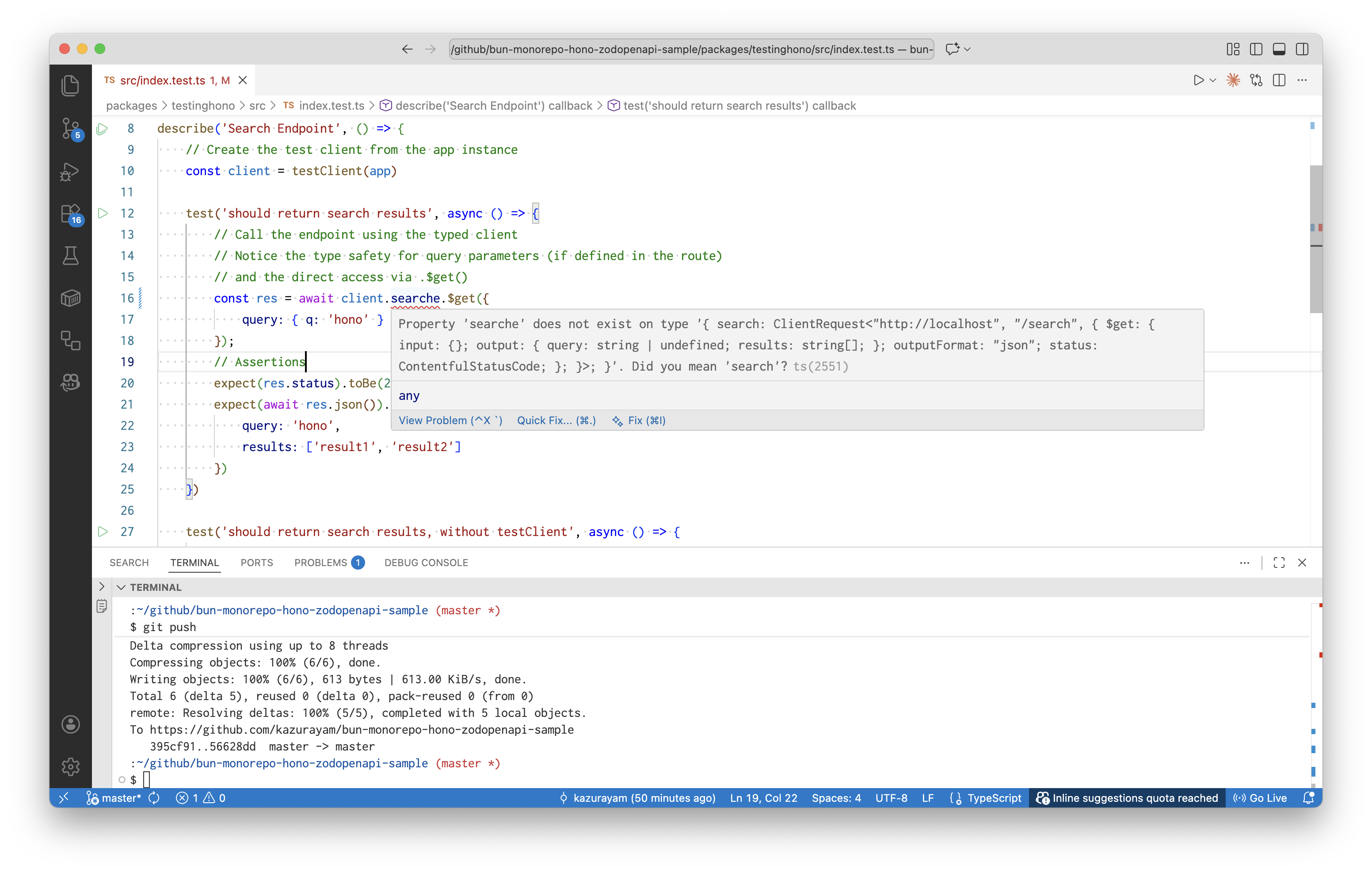
いっぽう、testClientを使わない後者のコードではどうか?
... = new Request('http://localhost/searche?q=hono', { method: 'GET' })
のようにstringリテラルの中でsearchをsearcheと書いたらどうか? … エディタはわたしがやらかした間違いを指摘することができない。
このように testClient はTypeScript言語の型検査の力をオーサリング時に享受できるようにしてくれる。testClientを使わなければ型検査の力を享受できない。この違いは大きい。だから testClient を活用するべきだ。